Yapay Zekâ ile Ürün Fotoğrafı Nasıl Çekilir? (2026 Rehberi)
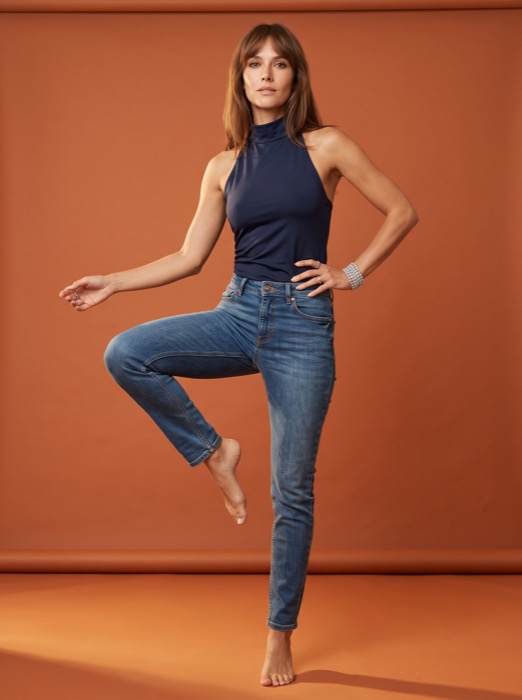
Yapay zekâ ile ürün fotoğrafı, tek bir ürün görselinden; manken, stüdyo, ışık ve fotoğrafçı olmadan profesyonel e-ticaret çekimleri üretmenizi sağlayan yöntemdir. Bu rehberde süreci adım adım, satıcı gözüyle anlatıyoruz.
Yapay zekâ ürün fotoğrafı tam olarak nedir?
Klasik ürün çekiminde bir ürünü mankene giydirir, stüdyoda ışık kurar ve fotoğrafçıyla saatler harcarsınız. Yapay zekâ destekli yöntemde ise ürünün tek bir net fotoğrafını yüklersiniz; model, ürünün kumaşını, rengini, desenini ve baskısını birebir koruyarak onu bir manken üzerinde veya profesyonel bir sahnede yeniden oluşturur.
Sonuç; ilan görseli, katalog, sosyal medya ve reklam için kullanabileceğiniz yüksek çözünürlüklü, tutarlı bir görsel setidir.
Adım adım: tek fotoğraftan profesyonel görsele
1. Doğru ürün fotoğrafını hazırlayın
En iyi sonuç için ürünü düz bir zeminde, iyi ışıkta ve net çekin. Kırışıklıkları giderin, etiketleri düzeltin. Girdi ne kadar temizse çıktı da o kadar iyi olur.
2. Kategoriyi ve sahneyi seçin
Giyim, tesettür, mayo, takı, çocuk veya katalog gibi kategoriyi seçin. Ardından mankenin beden tipini, pozunu ve arka plan sahnesini belirleyin.
3. Üretin ve varyasyonları karşılaştırın
Saniyeler içinde birkaç varyasyon üretilir. Markanıza en uygun kareyi seçer, yüksek çözünürlükte indirirsiniz.
İpucu: Aynı ürünü farklı pozlarda ve arka planlarda üreterek bir ürün için tek seferde birden fazla ilan görseli oluşturabilirsiniz.
Neden gerçek çekime göre avantajlı?
- Maliyet: Manken, stüdyo kirası, ışık ve fotoğrafçı gideri ortadan kalkar.
- Hız: Günler süren organizasyon yerine saniyeler içinde sonuç.
- Tutarlılık: Tüm ürünleriniz aynı kalite ve stilde görünür.
- Ölçek: Yüzlerce ürünü aynı iş akışında üretebilirsiniz.
Ürüne sadakat neden kritik?
E-ticarette iade oranını düşüren en önemli etken, görselin üründe gerçekten göreceğiniz şeyle aynı olmasıdır. İyi bir yapay zekâ ürün fotoğrafı aracı; kumaş dokusunu, renk tonunu ve baskı detaylarını değiştirmez, yalnızca ürünü uygun bir modele veya sahneye taşır.
Sık sorulan sorular
Yapay zekâ ürün fotoğrafı gerçekçi mi?
Evet. Güncel modeller, ürünü gerçek bir çekimden ayırt edilemeyecek kalitede manken veya sahneye yerleştirir.
Kendi ürün fotoğrafımı kullanabilir miyim?
Evet, sürecin tamamı sizin yüklediğiniz tek ürün fotoğrafı üzerinden ilerler.
Ne kadar sürede sonuç alırım?
Genellikle 30 saniye civarında birkaç varyasyon elinize ulaşır.
AI product photography lets you create professional e-commerce shots from a single product image — without a model, studio, lighting or photographer. This guide walks through the process step by step, from a seller's point of view.
What exactly is AI product photography?
In a classic shoot you dress a model, set up studio lighting and spend hours with a photographer. With the AI-powered method you simply upload one clear photo of the product; the model recreates it on a mannequin or in a professional scene while preserving the exact fabric, color, pattern and print.
The result is a high-resolution, consistent set of visuals you can use for listings, catalogs, social media and ads.
Step by step: from one photo to a pro visual
1. Prepare the right product photo
For the best result, shoot the product on a flat surface in good light and in focus. Remove wrinkles and straighten labels. The cleaner the input, the better the output.
2. Pick the category and scene
Choose a category such as apparel, modest wear, swimwear, jewelry, kids or catalog. Then set the model's body type, pose and background scene.
3. Generate and compare variations
Several variations are produced in seconds. Pick the frame that fits your brand best and download it in high resolution.
Tip: By generating the same product in different poses and backgrounds, you can create multiple listing images from a single product in one go.
Why is it better than a real shoot?
- Cost: No model, studio rent, lighting or photographer spend.
- Speed: Results in seconds instead of days of planning.
- Consistency: All your products look the same quality and style.
- Scale: Produce hundreds of products in one workflow.
Why is product fidelity critical?
The biggest driver of lower return rates in e-commerce is that the visual matches what the buyer will actually receive. A good AI product photography tool does not alter fabric texture, color tone or print details — it only moves the product onto a suitable model or scene.
Frequently asked questions
Is AI product photography realistic?
Yes. Modern models place the product on a mannequin or scene at a quality indistinguishable from a real shoot.
Can I use my own product photo?
Yes, the whole process runs on the single product photo you upload.
How fast do I get results?
Usually a few variations reach you in about 30 seconds.
Kendi ürününüzle deneyin
Bir ürün fotoğrafı yükleyin, profesyonel çekimi saniyeler içinde görün.
Stüdyoları Keşfet →